Views Board for Drupal: your own Trello-style project board, with a Gantt chart and a dependency map, in the site you already run
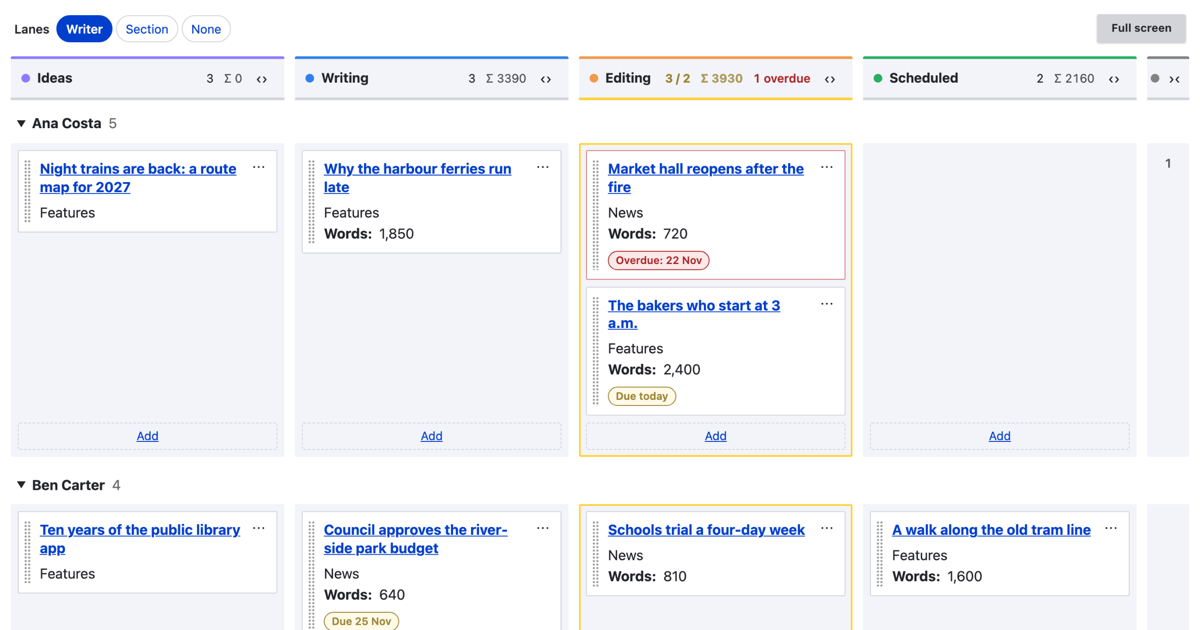
The work already lives in Drupal. Articles move from idea to draft to scheduled, tasks from to do to done, requests from new to answered, and each of them has a status field someone changes by opening the edit form, changing one select and saving. Seeing the whole picture means a table with a status column, or copying everything into a board in another tool and keeping the two in step by hand until they drift apart.
What the team wanted was the board itself: the same items, in columns, moved with the mouse or the keyboard, and saved where they already are.
Views Board adds three formats to Views: Board, which draws the rows of any view as cards in columns, one column per value of a field, optionally split into lanes by a second one; Gantt, which draws the same rows as bars on a time axis; and Dependencies, which sets them out in waves of what waits for what. The Gantt and Dependencies formats are submodules, as are a Dependency field and two tools that hand the board to AI agents, MCP servers and Drush. It is free software under GPL-2.0-or-later, and 1.0.0, released on 24 November, is its first stable release.
Your own Trello, in the site you already run
A Trello-style board takes no code. Create a Task content type with a list field for its state, a reference to the person doing it and a due date. Build a view of tasks, choose Board as its format, and make the state the columns and the person the lanes. Add the Dependency field and a second display in the Gantt format, and the same tasks become a plan that shows what blocks what.
There is no limit on boards, because a board is a display of a view. One view can carry a board, a Gantt and a map of dependencies over the same tasks, and a contextual filter turns one display into a board per project, per client or per person, each at its own address.
With the Group module, each project or client is a group with its own members and roles, and a contextual filter on the group gives every group its own board from that one view. Group decides who may see and edit each task, and Views Board asks the same question before a card moves: a member allowed to edit the group's tasks moves its cards, a member who may only read sees the board without handles, and someone outside the group sees none of its tasks.
The tasks stay where the rest of the site is: the same accounts, the same groups and permissions, and references to the content, clients and contracts they are about. We run our own projects this way. Our intranet keeps each client's work in a group, with a board per group in lanes by person, and the waves and the Gantt for plans that have milestones and dependencies. Most of the module was first something we needed there.
It is not Jira, and it does not try to be. There are no sprints, no burndown or velocity charts, the Gantt does not compute a critical path or move dates by itself, and the module sends no notifications. A move is a normal save, so whatever the site already does on save still runs, and an ECA rule or a few lines of code send the email. A rule such as "the person a task is assigned to may move it without the right to edit it" takes a small event subscriber, which is how our intranet does it.
What you can build with it
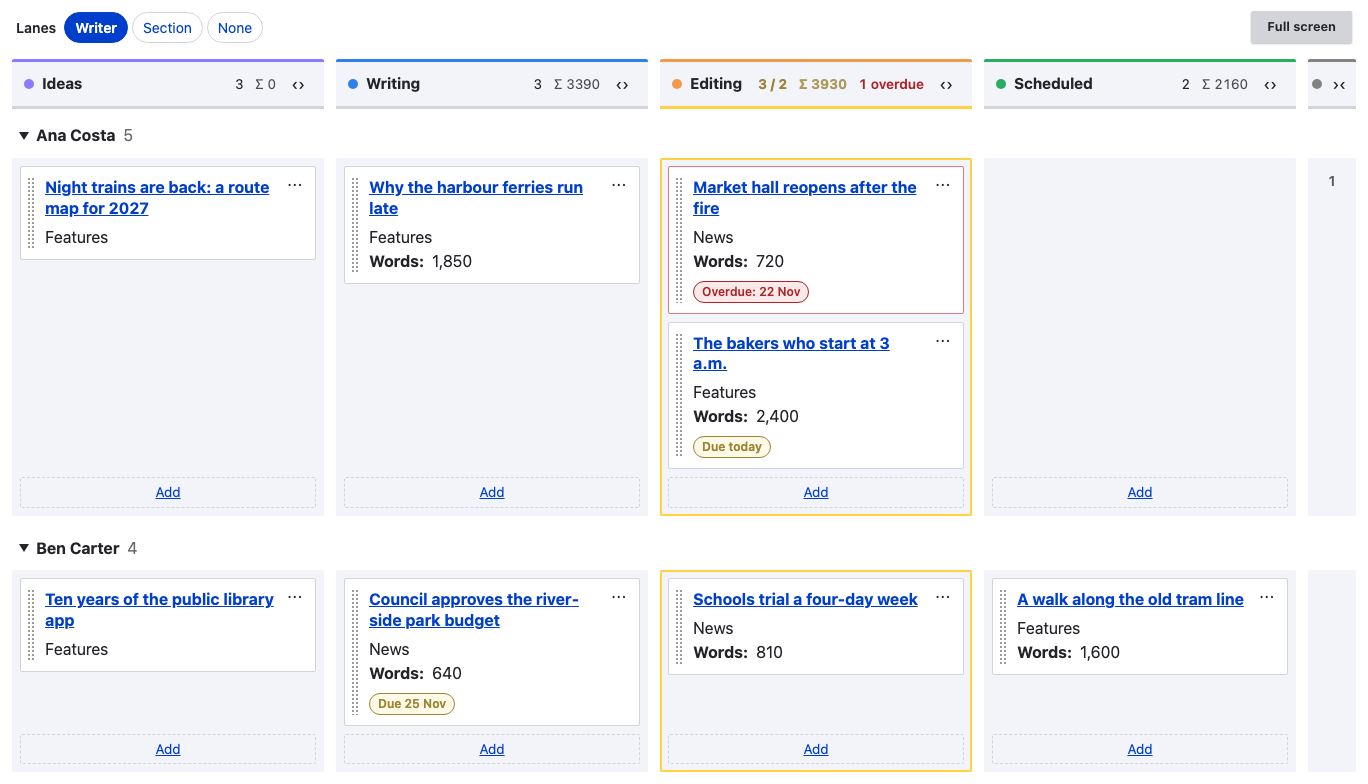
- An editorial board where articles move from Ideas to Scheduled, split into one lane per writer, with a work-in-progress limit on Editing and the word count of each column added up in its head.
- A task board with a switch above it to see the same cards by person, by section or with no lanes at all.
- Cards that say "Overdue: 22 Nov" or "Due today" in words, and column heads that count what is late.
- A launch plan set out in waves, where each step sits one column after the furthest step it waits for and the filters pick out what can start today.
- A Gantt chart of the same plan, with a bar for each task, arrows for what blocks it and a zoom from days to months. Dragging a bar, or either of its ends, changes its dates.
- An assistant that answers "what has been in Doing for a month?" and then puts those cards on hold, with no more rights than the account it runs as.
The board
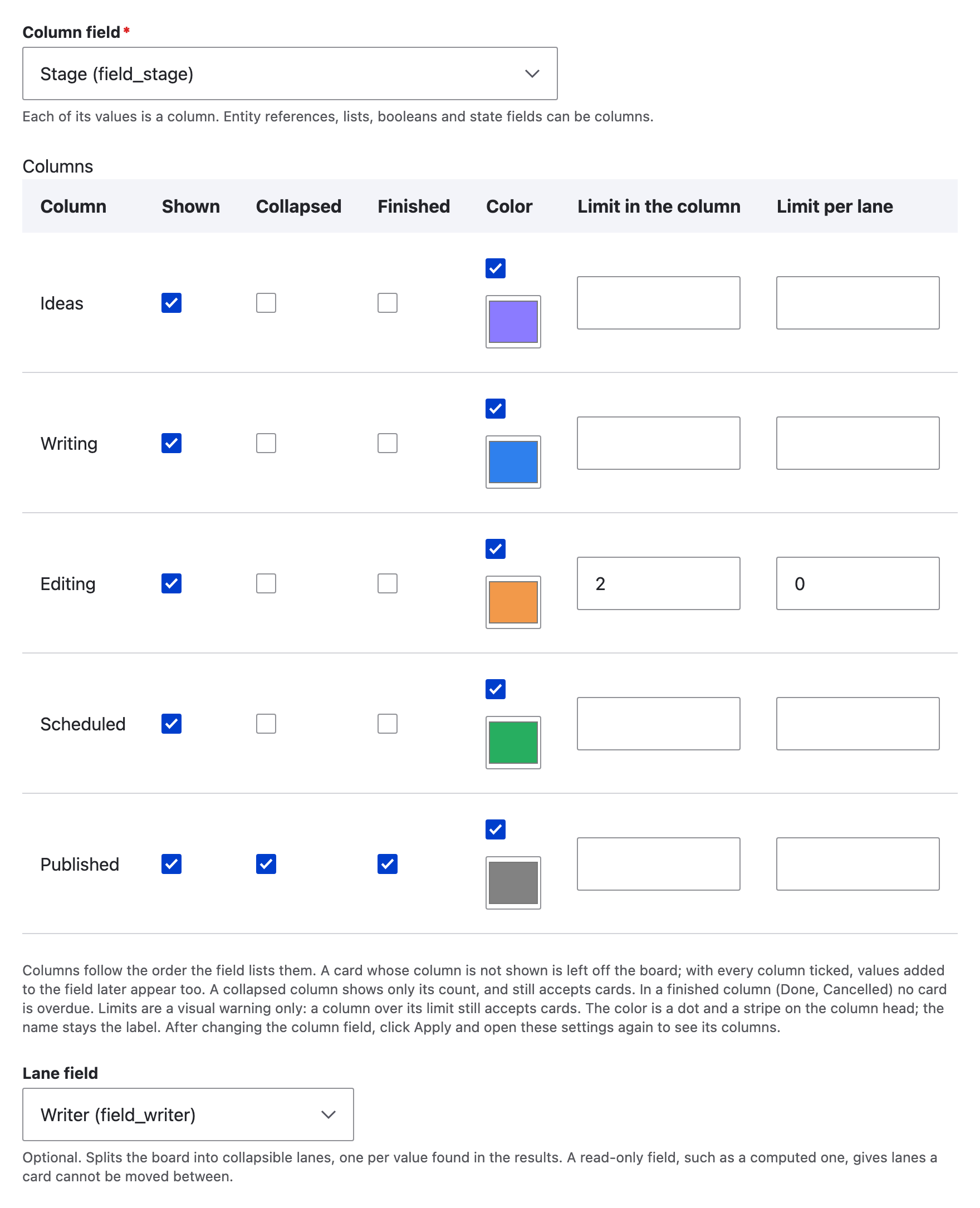
The board is a Views format, so everything a view already does still applies. Filters, contextual filters and exposed forms decide which cards appear, which is how one view becomes a board per group, per project or per person. Any entity stored in SQL works: content, users, taxonomy terms. The columns are the values of a single-value field, a list, a taxonomy reference, a boolean or a workflow state, in the order the field gives them.
Each column can be shown, collapsed to a narrow strip that still accepts cards, coloured, marked as finished, and given a work-in-progress limit, which warns without refusing. A lane field splits the board by person, section or any other field, and the reader can switch between the lane fields you offer, or none, from links above the board. Lanes that stand for something with a date, a milestone or a sprint, can follow that date instead of the alphabet.
What a card shows is a view mode, so it is set in Manage display like any other. For long boards, the column heads can stay at the top of the window while the page scrolls, with a line naming the lane underneath, and a Full screen button gives the board, its filters included, the whole screen.
Moving cards, with the mouse or the keyboard
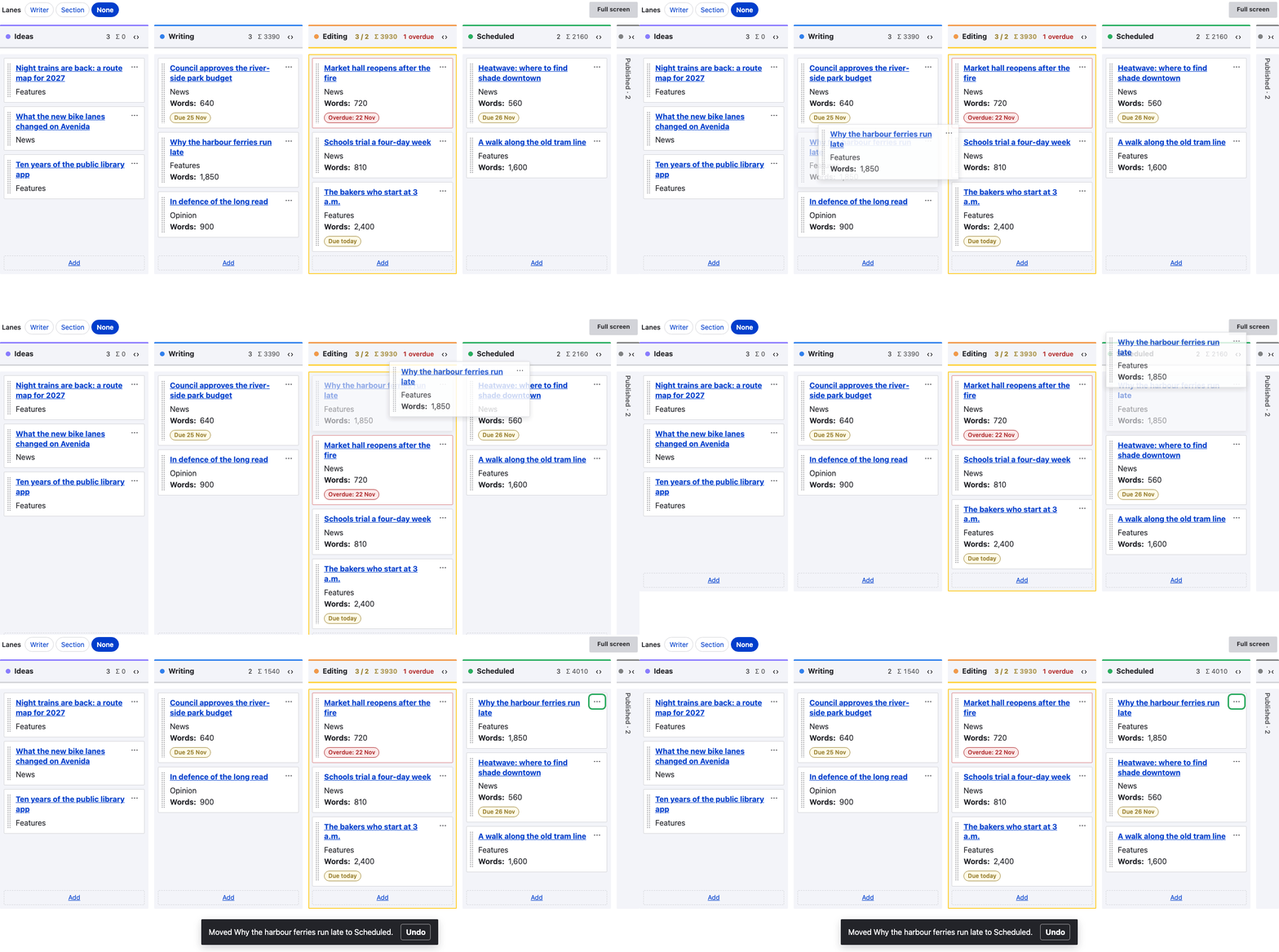
Drag and drop works with a mouse, a pen or a finger. Every card the person may move also has a Move… menu, which lists the columns, the lanes and the top or bottom of the column, and works from the keyboard: arrow keys, Enter to choose, Escape to close. That follows Atlassian's guidance for accessible drag and drop, visible controls rather than dragging by keyboard.
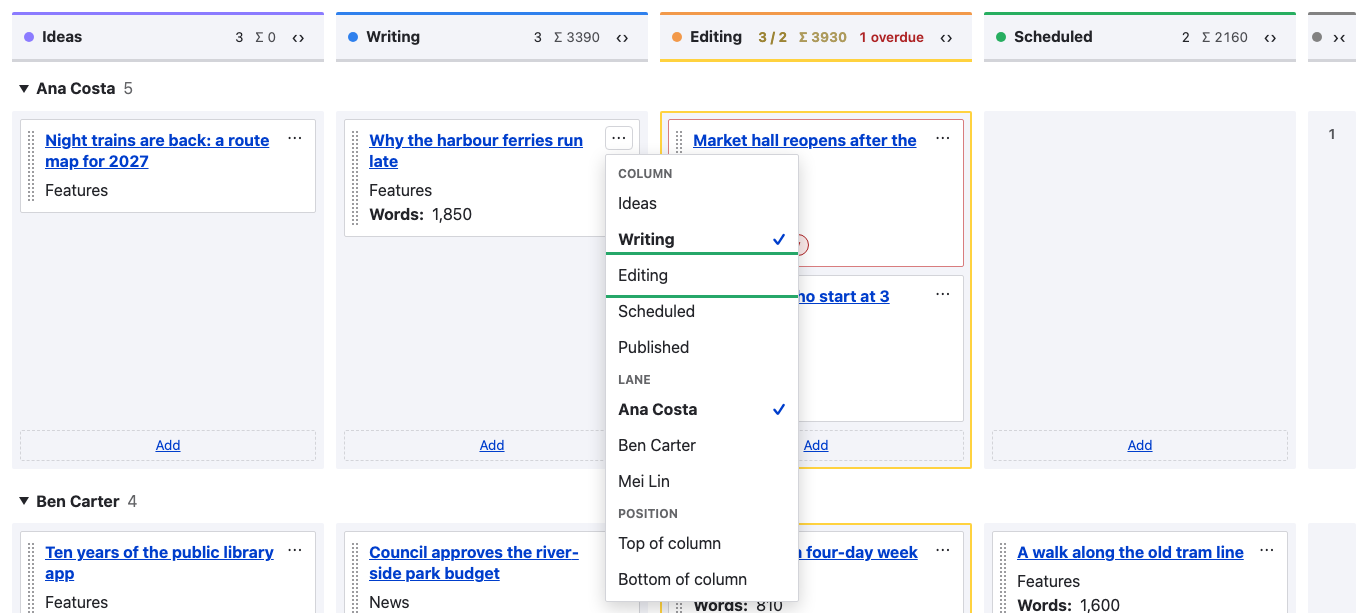
Every move is announced to screen readers, focus returns to the card, and the confirmation at the bottom of the window has an Undo. Colour is never the only signal: an overdue card says so in words, and a column keeps its name next to its colour dot. The board uses core's SortableJS library and nothing else: no jQuery, no Bootstrap.
What waits for what
A board can say what blocks each card. Point it at an entity reference field and each card lists the items it waits for, each one pending, met or in conflict, read from the column the other item is in. A task finished before what it waited for shows the conflict in red.
The Dependency field submodule adds a field made for this: a reference that also records how one item waits for another, with the four link types of a Gantt chart (finish to start, start to start, finish to finish, start to finish), and that refuses to save a cycle.
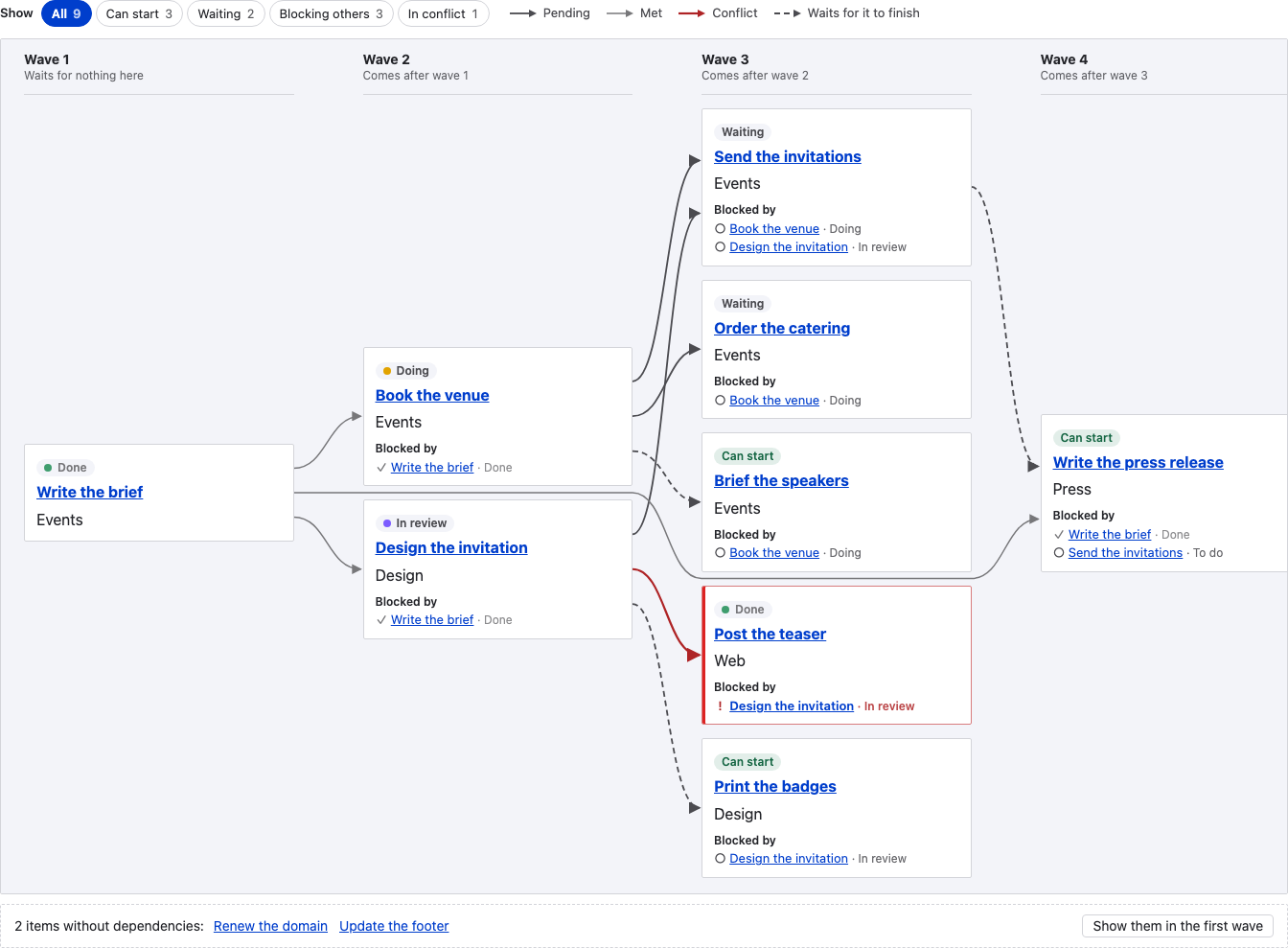
The Dependencies format sets the same cards out in waves. The first wave waits for nothing on the page, the second comes after the first, and every arrow points right, so the shape of the work shows without any dates: which chains are long, what many things wait on, what is free to start once one thing is done. Filters pick out what can start, what is waiting, what is blocking others and what is in conflict, and hovering or focusing a card follows its chain both ways.
The Gantt
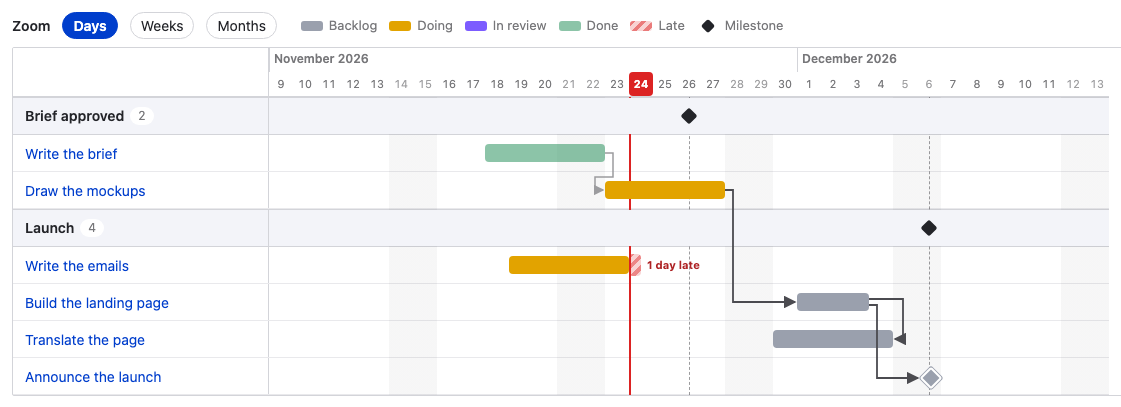
The Gantt format draws the same view on a time axis: a bar per item, coloured by its column and grouped by its lane, with weekends shaded, a line for today, a diamond for the date of each lane that stands for a milestone, and what blocks each item drawn as arrows between the ends its link type names. A bar can start at a start date, at the due date less a duration such as an estimate in hours, or, on a site that keeps a history of its items, on the day work on it began, and an item with a due date alone is a marker on that day. A zoom switches between days, weeks and months.
Dragging a bar moves it in time, and dragging either end moves that end. A Change dates dialog does the same from the keyboard or on a touch screen. It needs no chart library: the bars are laid out by CSS from dates the server writes, so the chart shows even without JavaScript.
For AI agents, MCP servers and Drush
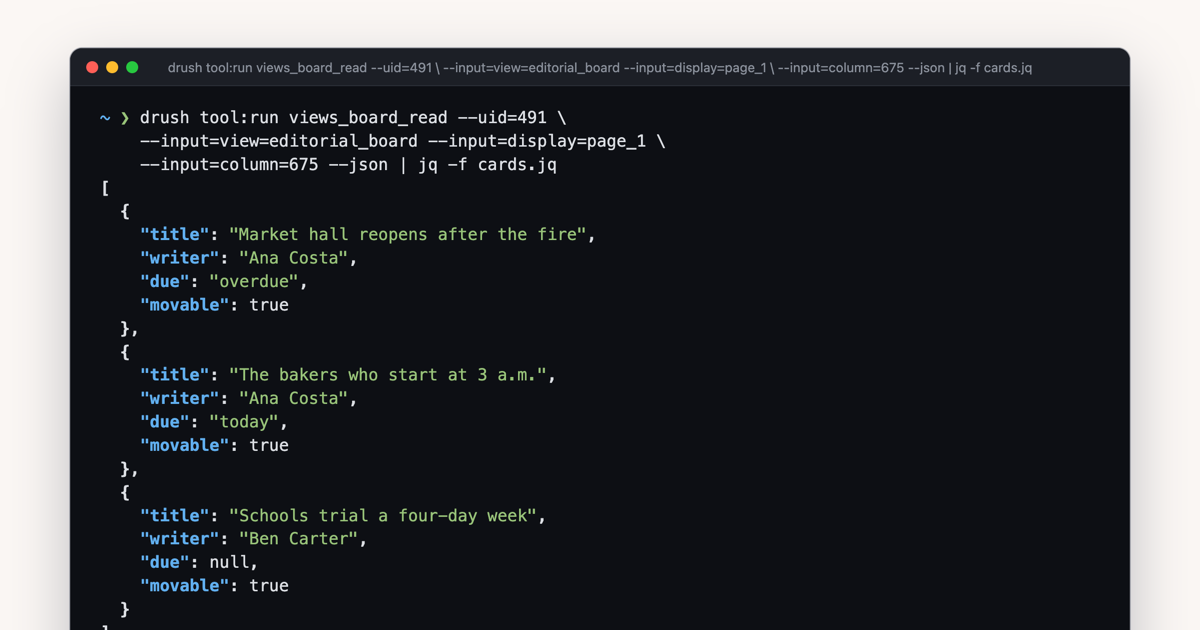
The Views Board Tools submodule turns a board into two tools of the Tool API: one reads a board and one moves a card. A tool is written once and reaches three kinds of caller: the agents and assistants of the AI module, MCP servers built on Tool API, and Drush. The read is the board as that account sees it, with the view's filters and access, so an agent asked what is overdue in Editing gets the cards the person would see, with their column, lane, due state and what they wait for.
A move is an edit, and it is checked like one
Views Board adds no permissions of its own. Who sees a board is the view's access, and who moves a card is the entity's update access and the edit access of every field the move changes: the column, the lane, the order. A card the person cannot move shows no handle and no Move… button. A move the server refuses puts the card back where it was and says why in plain text.
Every move is saved through the entity's normal save, so validation, revisions and anything a site does on save all run. A module can veto a move before it happens, act after it (send an email when a task reaches Review, say), or let people move cards they may not edit, such as the person a task is assigned to. Reordering a card within its column is not treated as an edit: it creates no revision and does not make the card look just changed.
The Gantt and the tools take the same route. A dragged bar is checked as a moved card is, and an agent's move goes through the same service as a drag in the browser, adding no check and removing none. An agent can only do what the account it runs as could do on the page.
Get it
composer require drupal/views_board
drush en views_board
Then create or edit a view, choose Board as its format, and pick the column field. It requires Drupal 10.3 or later, or Drupal 11, and stable releases are covered by Drupal's security advisory policy. The waves, the Gantt, the dependency field and the AI tools are submodules, enabled separately; the tools need Tool API.
The README starts with a quick start that builds a board of articles from a standard Drupal site, and covers theming, the events and the move endpoint. If your board needs something it does not do yet, tell us in the issue queue.