AI Email Sections for Mautic: an AI assistant in the email builder that cannot break your email
Most "AI writes your email" features share the same weakness: they hand you a blob of HTML and wish you luck. Paste it into a real email builder and things fall apart quietly. Tags the builder does not understand, layouts that only survive one email client, personalisation tokens that vanish somewhere between the chat window and the canvas. The demo looks great; the Tuesday morning newsletter does not.
We run email marketing for our clients on Mautic, the open-source marketing automation platform, and its GrapesJS builder is where those newsletters actually get made. So instead of an AI that writes emails somewhere else, we put one inside the builder, and made the platform check its work. We are now releasing it to the community: AI Email Sections, a free (GPL) plugin for Mautic 7.
Describe a section, get a section
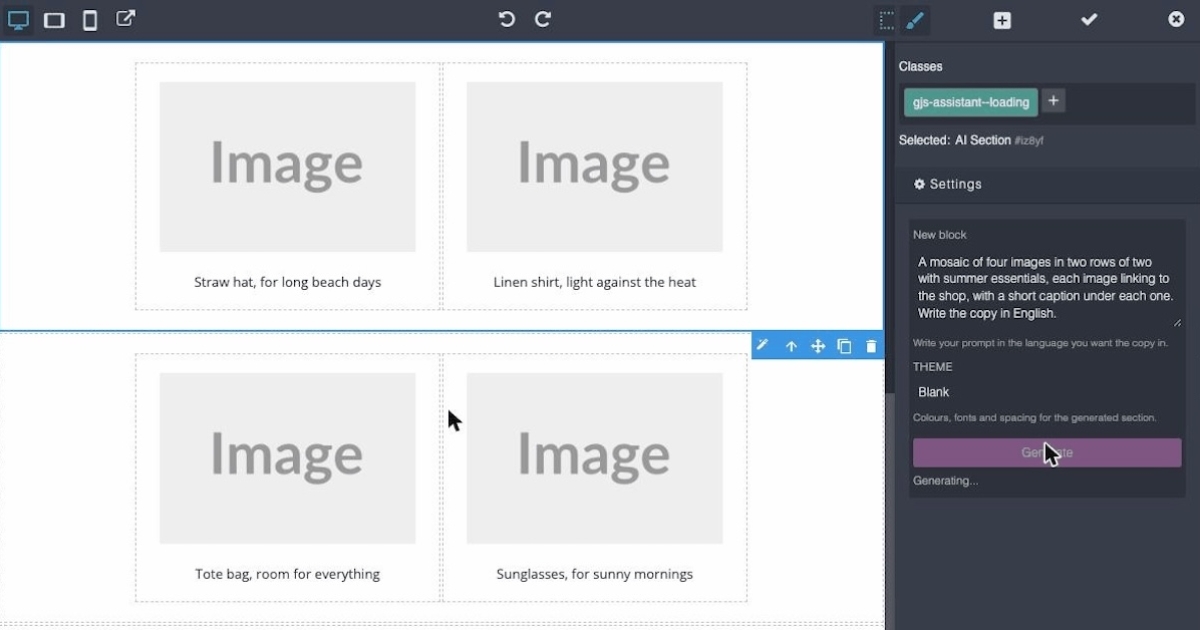
The plugin adds an AI Section block to the builder. Drag it onto the canvas, describe what you want in plain text ("a hero for the summer collection", "a 3-column product grid with buttons", "a testimonial with a photo") and press Generate. A few seconds later the section is on the canvas, styled with your theme's colours and typography, and editable exactly like anything you would have built by hand. It also works on what already exists: select a section, ask for a change ("make it two columns", "shorten the copy") and it rewrites that section in place.
The interesting part is what it refuses to do
The model never talks to your email directly. Everything it produces goes through a validator before it reaches the canvas:
- It generates MJML, the component language for responsive email, never raw HTML, so the output is portable across email clients by construction.
- A strict tag allowlist rejects anything the builder cannot handle. No invented tags, no rogue markup.
- When a response fails validation, the plugin retries automatically, feeding the validator's complaints back to the model.
- In edit mode, preservation checks verify that a change did not silently drop your links, images or personalisation tokens. If the AI loses your unsubscribe link, the edit does not land.
That last category is the one that convinced us this needed to be a proper plugin rather than a prompt. The failure mode of AI in email is not the bad first draft you can see; it is the link or token that quietly disappears on the fourth revision.
It knows your brand and your data
A configurable brand brief (voice, audience, rules) is applied to every generation, and the plugin reads the palette and typography of the theme the email uses, so sections come out looking like yours rather than like a template. It also knows the personalisation tokens available in your Mautic instance, so "greet the customer by first name" produces a working {contactfield=firstname} instead of a made-up placeholder that would reach the inbox as literal text.
Born in production
The plugin was born inside the email marketing we run for our e-commerce clients, where the newsletters that reach subscribers are now assembled section by section this way: header, hero, product grids, footer, each one generated from a short description and adjusted in the builder. Building a complete newsletter went from an afternoon to a conversation.
Bring your own model
It works with Anthropic's API or any OpenAI-compatible endpoint, which includes OpenAI itself, LiteLLM, and local models through Ollama or LM Studio if you prefer to keep everything on your own infrastructure. With a hosted model, each generation costs a fraction of a cent.
Reviewed before it reaches you
As part of the submission to the Mautic Marketplace, the plugin went through a security review by the Mautic core team. Everything raised was fixed and shipped the same day in v1.0.6, each fix covered by a test that failed against the old code first. The full exchange is public in the marketplace pull request, which is how we think security should work in open source: reviewed by someone who did not write the code, fixed in the open, verifiable by anyone.
Get it
AI Email Sections is free software (GPL-3.0). It is listed in the Mautic Marketplace, so on any Mautic 7 installation you can install it from Settings, Plugins, Marketplace, without touching the command line. It is also installable with composer require bloomidea/mautic-plugin-ai-email-sections. The code, a demo GIF and the documentation are on GitHub, the package is on Packagist, and there is a discussion thread on the Mautic forum. Feedback, issues and pull requests are very welcome.