Rendering Mermaid diagrams in Drupal, and the highlight.js trap along the way
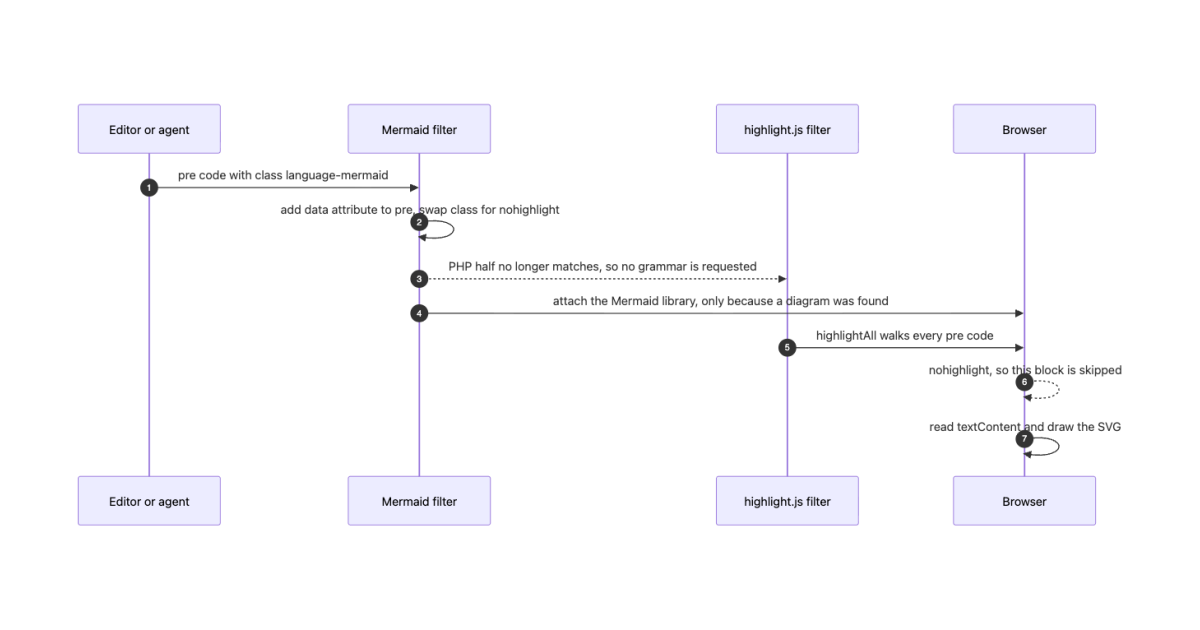
This started with an agent writing a comment into our Drupal intranet. It had traced an authentication flow, decided a sequence diagram was the clearest way to say it, and wrote one. What landed on the page was a grey box of monospaced text.
That is a small failure with a wider shape behind it. A growing share of what gets written into a Drupal site is no longer typed by a person into CKEditor. It arrives through an API, from a script, from an agent with an MCP connection to the site. And whatever writes it, the diagram comes out the same way:
<pre><code class="language-mermaid">sequenceDiagram
Alice->>Bob: hello</code></pre>That is not a choice anyone made. It is what a fenced ```mermaid block becomes when Markdown is converted to HTML, which is the shape a language model writes in because it is the shape it was trained on. It is also, independently, exactly what CKEditor 5's Code Block plugin emits when a human picks a language from the dropdown. Human authors and machine authors converge on the same markup, which is a convenient thing to be able to rely on.
Mermaid is worth supporting for the ordinary reasons too. The diagram stays as text in the field, so it is searchable, it diffs, and the next person fixes one line instead of rebuilding a PNG that nobody has the source for. But the reason it became urgent for us is the one above: content we did not hand-write was arriving in a form the site silently failed to render.
Getting it working turned out to be short, with one genuinely non-obvious trap in the middle. This post is the trap, wrapped in the working solution.
What already exists
Mermaid Integration is the contrib module. It has been around since 2020, it is maintained by people whose names you will recognise, and its filter renders diagrams from a [mermaid]...[/mermaid] shortcode.
That syntax is the whole problem, and it is worth being precise about why. No model will ever emit [mermaid] unprompted, because nothing in its training data looks like that. Neither will any Markdown converter, nor CKEditor, nor a paste from a README. A human can be told to switch to source view and hand-type a shortcode. A pipeline cannot be told anything, and it does not fail loudly: the content saves fine, the page renders fine, and the diagram is simply a code block forever.
So a shortcode-only integration is invisible to every non-human author your site has. That is a different problem from being inconvenient, and it is the one that decided this for us.
We wrote our own filter rather than fight that, and we are contributing code block support back upstream. More on that at the end.
The filter
The pattern to copy is Highlight.js Input Filter. Its filter does a cheap regex first and only attaches its libraries when the text actually contains a code block. That conditional attachment is the whole game when your library is measured in megabytes.
public function process($text, $langcode): FilterProcessResult {
  $result = new FilterProcessResult($text);

  // No diagram in this text: attach nothing, change nothing.
  if (!preg_match(self::DETECT_PATTERN, (string) $text)) {
    return $result;
  }

  $count = 0;
  $processed = preg_replace_callback(self::BLOCK_PATTERN, /* ... */, (string) $text);

  if ($processed === NULL || $count === 0) {
    return $result;
  }

  $result->setProcessedText($processed);
  $result->addAttachments(['library' => ['your_module/mermaid']]);

  return $result;
}
Nothing surprising so far. Then you turn it on next to your existing syntax highlighter and the page breaks in two ways at once.
The trap: highlight.js has two halves
Our site runs Highlight.js Input Filter on the same text format. The moment a language-mermaid block appeared, two things went wrong: a 404 in the console on every page with a diagram, and syntax highlighting painted underneath the rendered graph.
The 404 is easy to explain. That module scans the text server-side for language-* classes and passes the languages it found to the browser in drupalSettings, and the front end then imports a grammar per language from a CDN. There is no Mermaid grammar in highlight.js, and there never will be, because highlighting and diagramming are not the same operation. One paints tokens and leaves the text as text. The other deletes the block and draws something else in its place. So the import 404s:
GET https://unpkg.com/@highlightjs/[email protected]/es/languages/mermaid.min.js 404The obvious fix is filter weight. Give your filter a negative weight so it runs before the highlighter, take the block out of the way, done.
It is not enough, and this is the part worth remembering. The highlighter has a second half that filter weight cannot reach. Its JavaScript calls:
hljs.highlightAll();highlightAll() walks every pre code element in the document and auto-detects a language for each one. It does not consult drupalSettings. It does not know or care what your PHP decided. Ordering filters fixes the server-side half and leaves the client-side half completely untouched, which is why the double-render survives a fix that looks like it should have worked.
So the filter has to change the markup, not just run first. Two edits, one per half:
// Before: what CKEditor stored.
<pre><code class="language-mermaid">…

// After: what our filter emits.
<pre data-bloom-mermaid="1"><code class="nohighlight">…
The attribute on the <pre> defeats the server-side half, because that module's regex requires a bare <pre> immediately followed by <code:
'/<pre>\s*<code\s+class="\s*(?:[\w-]+\s+)?\b[\w-]*lang(?:uage)?-([\w-]+)\b/i'Add any attribute and it stops matching, so mermaid never reaches drupalSettings and the 404 never happens.
The nohighlight class defeats the client-side half. It is the class highlightElement checks before giving up on an element:
const shouldNotHighlight = (languageName) => /^(no-?highlight)$/i.test(languageName);Both, or you have only half a fix. We have this written down in the repo with a note not to remove it, because the rewrite looks redundant if you only know about the filter ordering.
There is a neater variant available if you control the output shape. Contrib's module emits <pre class="mermaid"> with no <code> element inside at all, and highlightAll() selects pre code, so the collision simply cannot occur. We kept the <code> because we wanted a readable code block as the failure mode. Pick whichever tradeoff you prefer, but pick deliberately.
Vendor the library, and know what you are vendoring
Contrib pulls Mermaid from cdn.jsdelivr.net with no version pin. We wanted the file in the repo: no third-party dependency in the critical path of an internal page, and no surprise when a major version lands.
The tidy Drupal answer is composer require npm-asset/mermaid, which installs into web/libraries. We measured before committing to it, and the numbers ended the discussion. Mermaid 11.16.1 unpacks to 83 MB across 1171 files, about 26 MB of which are source maps that never reach a browser. web/libraries is tracked in git in our project, so that is 83 MB of repository for one diagram renderer.
What you actually need is one file. dist/mermaid.min.js is the self-contained UMD build, 3.6 MB raw and 975 KB gzipped, and it sets globalThis.mermaid. We vendored that single file with a README next to it recording the version, the licence, the exact source URL and the upgrade command.
3.6 MB is still a lot, which is exactly why the conditional attachment matters. A page with no diagram downloads none of it. We also set preprocess: false on the library so a file that size stays out of the aggregated JavaScript bundle:
mermaid:
  version: 11.16.1
  js:
    js/vendor/mermaid.min.js: { minified: true, preprocess: false }
    js/mermaid-init.js: {}
  dependencies:
    - core/drupal
    - core/once
Two details in the JavaScript
Read textContent, never innerHTML. The stored markup escapes the arrows, so a sequence diagram is sitting in the database as A-->>B. textContent gives you the decoded text that Mermaid's parser expects; innerHTML hands the parser the entities and it fails on every diagram with an arrow in it, which is to say all of them.
A broken diagram must never break the page. Someone will eventually get the syntax wrong in a comment, and a syntax error in one diagram cannot be allowed to take down a task page. So the render is wrapped, the failure is silent, and the original code block stays visible and readable:
mermaid.render(id, source)
  .then((result) => { /* replace the <pre> with the SVG */ })
  .catch((error) => {
    // Degrade to the plain code block.
    pre.classList.add('bloom-mermaid-error');
    console.warn('Mermaid: diagram not rendered.', error);
  });
Set securityLevel: 'strict' while you are there, and suppressErrorRendering: true so Mermaid does not inject its own error graphic into your page when a parse fails.
One more that cost us a test to find: Mermaid leaves a throwaway measurement element in document.body when parsing throws. It cleans up after a successful render but not always after a failed one. Remove #d<your-id> in a finally.
Adding it to the editor
Last step, and easy to forget: put Mermaid in CKEditor's Code Block language list, so authors can pick it from the dropdown instead of needing source view.
plugins:
  ckeditor5_codeBlock:
    languages:
      # …
      -
        label: Mermaid
        language: mermaid
Export that config. If it only exists in the active store, the next config:import takes it away again.
Contributing back
None of the above is Mermaid-specific except the library name. Any renderer that replaces a code block rather than colouring it hits the same two-halves problem: PlantUML, Vega-Lite, ABC notation, chemical structures. If you build one of those, the ordering fix will look like it worked and it will not have.
Two merge requests are open against Mermaid Integration:
- #3616088 adds code block support alongside the shortcode, carries the highlight.js de-confliction, and makes the library attachment conditional instead of unconditional.
- #3592975 adds the config schema the filter currently lacks. Without it, installing the module blocks saving any text format on Drupal 11.3, whether or not the Mermaid filter is enabled anywhere.
Reviews welcome.
As for the comment that started this: the agent reran it after the filter went live, and the diagram drew. Which is the useful test, in the end. If the machines writing into your site cannot render a diagram, neither the machines nor the people reading after them get one.