From the DAM to the Instagram feed without a second tool: a ResourceSpace plugin for on-brand posts and stories
Most brands with a photo library know this routine. Someone on the marketing team needs a story for tomorrow, finds the photo in the DAM, downloads it, opens a design tool, crops it to 1080 by 1920 and places the logo by eye. The next person does the same, slightly differently. A few weeks later the feed no longer looks like one brand.
At one of our clients, a footwear brand whose mark is a small bow, the design tool was Photoshop and the routine was exactly that. The photos already lived in ResourceSpace, the open source digital asset management system, more than 17,000 files of them. What was missing was the last step: getting a photo out of the DAM in the right shape, with the bow where it belongs. So we added that step to the DAM itself.
What the open source part already did
ResourceSpace, released under a BSD-style licence, holds the originals, their metadata, who may see each one and who downloaded what. Its Image tools plugin crops and resizes, but places nothing on top of the image, so a crop made there still came out without the bow and still went through Photoshop.
The gap was narrow. The team did not need a new platform or a new design tool, only one more screen in the system where the photos already were.
From the photo to the post in one screen
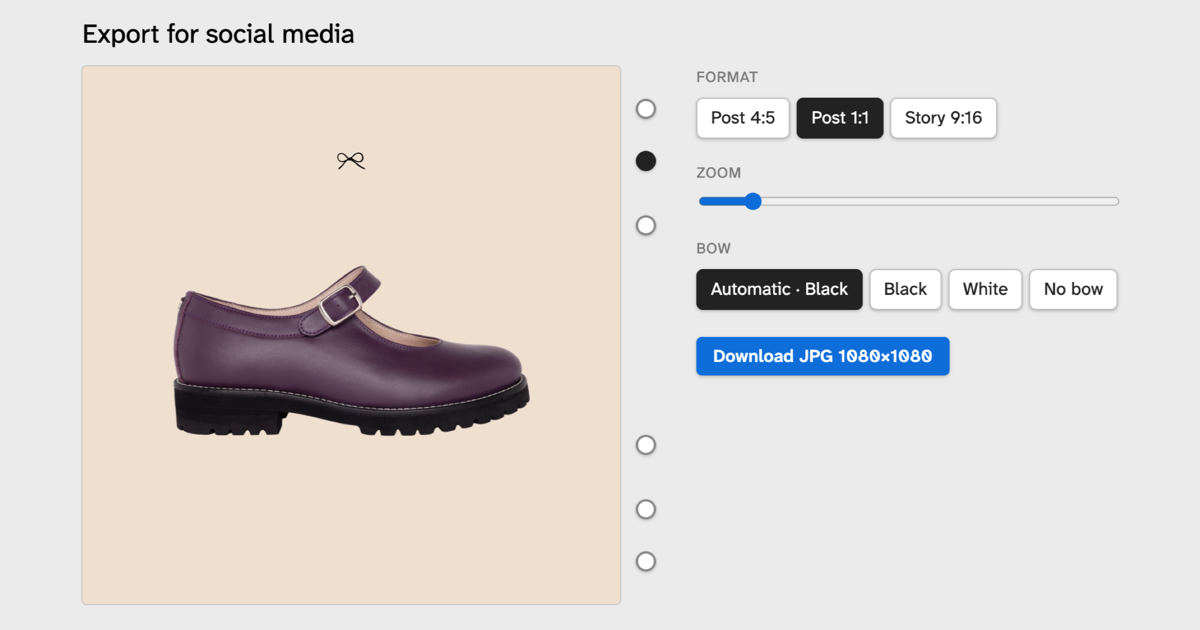
On any image, next to Image tools, there is now an Export for social media link. It opens an editor where the person:
- picks the format: Post 4:5 (1080 × 1350), Post 1:1 (1080 × 1080) or Story 9:16 (1080 × 1920);
- drags and zooms the photo inside a fixed frame until the shoe sits where it should;
- picks one of six bow positions, three near the top and three near the bottom;
- leaves the bow colour on Automatic, or chooses black, white or no bow;
- downloads a JPG at exactly that size.
Product shots with a transparent background land on the brand's beige, and can be zoomed out so the shoe sits smaller in the frame, the way the brand's own stories show them. When the original is too small for the format, a yellow warning says the file will come out softer.
What it refuses to do
The bow cannot be resized or dragged. It is always centred, always 5.2% of the image width, which is the size measured on the brand's own reference story, and each of the six positions is measured from the nearest edge as a share of the width, so a bow near the bottom lands at the same distance in a post and in a story. Six fixed places is a restriction on purpose: free placement is what produced a feed with the bow somewhere different on every post.
Automatic colour works the same way. It reads the pixels under the bow and picks black or white from their median brightness rather than the average, because a patch that is half black shoe and half pale floor averages to a grey that none of its pixels has. The switch point is where black and white give the same contrast. And nothing touches the photo in the DAM: exporting only creates the file you download.
What the person who runs the DAM gets
A marketing request that lands in a system someone else maintains is usually where it stalls. This one was built so that whoever answers for the DAM has nothing to undo later.
It is a plugin, not a patch. ResourceSpace core is untouched, so the next upgrade does not overwrite it. The link only appears for people who have full access to the image and may download its original, the same people who can use Image tools on it, and the DAM already sits behind the brand's single sign-on. The file goes out through ResourceSpace's own download path, terms page included, so it is logged against the image like any other download.
The framing is calculated twice, in the browser for the preview and on the server for the file, and both are held to the same numbers by one shared file of test cases. The browser decides the bow colour and sends that decision with the request, so the server never second-guesses it: the file is the image that was approved on screen. In the three cases we compared side by side, screen and file matched.
One limit is known and written down: an image with a colour profile other than sRGB loses the profile instead of having it converted. In a random sample of 20 originals from this DAM, none had one.
When a design tool is the better answer
Design tools have their own answer. Canva's Brand Templates and Adobe Express's locked templates let a designer fix the logo's position and style and leave the rest editable. For a team that already composes its posts in one of them, a locked template solves the consistency problem without a line of code, and we would not build this for that team. A team that works in Photoshop can get close with a template file that keeps the bow on a locked layer, but the photo still leaves the DAM, and the crop and the bow's colour are still chosen by eye. Anything composed, several products in one image, text over the photo, a layout, is design work and belongs in the design tool anyway: the plugin exports one photo at a time.
Building it into the DAM earns its place when three things are true:
- the photos already live in a DAM, and leaving it is the step people do differently;
- the brand rule can be written down as numbers: these sizes, these six places, black or white;
- the rule should hold for everyone with access, not only for the people who remember the template.
If the rule needs a designer's judgement each time, keep the designer and the design tool. If it can be measured, the system that holds the photos can enforce it.
The same shape, again
We have met this shape before, in Mautic: our AI Email Sections plugin puts an assistant inside the email builder rather than beside it. The open source platform carries the weight. The last step is specific to one brand, so it is the one step a vendor has no reason to build, and it is small enough to write, test and maintain inside the platform the brand already runs.