Measuring ChatGPT ads on Drupal, from the browser and from the server
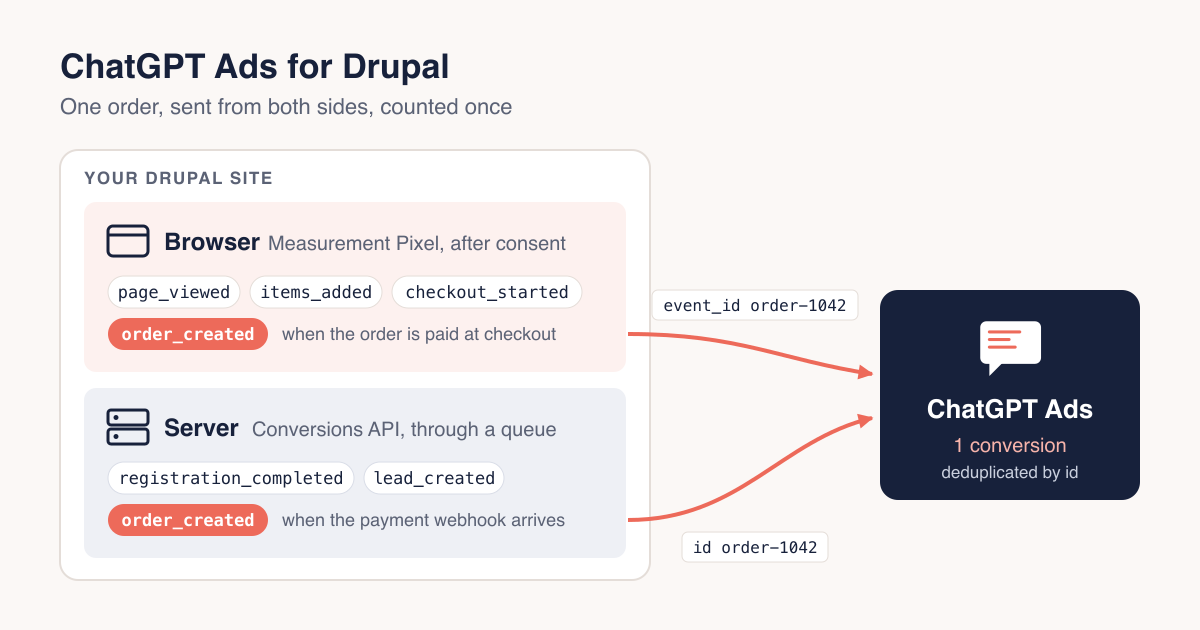
Since September, advertisers in Europe can buy ads inside ChatGPT, and the Ads Manager asks for two things before it can tell you whether they work: a measurement pixel in the browser and, ideally, conversions sent from your server. On a Drupal site that usually means pasting a snippet into the theme, writing the order_created call by hand in a template, and trying to hide the whole thing behind the cookie banner. Then the order paid by bank transfer or payment reference hours later, confirmed by a webhook, never shows up, because no browser was there to see it.
Even when a browser is there, the pixel loses part of the picture. Ad blockers stop it outright, Safari caps cookies written by scripts at seven days, and iOS removes tracking parameters from links shared in Messages and Mail and from links opened in private browsing. OpenAI's own documentation calls the Conversions API "a more reliable tracking source than the pixel alone".
We have released a module for this on drupal.org: ChatGPT Ads, free software under the GPL, for Drupal 10.3 and 11, covered by Drupal's security advisory policy. It plugs into Drupal Commerce, Webform and the Klaro consent manager through sub-modules, and sends events through both OpenAI's Measurement Pixel and the Conversions API. It is a community module, not affiliated with OpenAI.
What you can measure
- With Drupal Commerce, every product added to the cart, including from an AJAX add-to-cart button, with its SKU, quantity and price.
- The start of checkout, and the order itself when it is paid, not merely placed, so an unpaid bank transfer or an expired payment reference never counts as a sale.
- The order paid later and off-site, reported from the server when the payment webhook arrives, with the same event id as the browser, so OpenAI counts it once.
- With Webform, a contact form, a quote request or a newsletter sign-up as a lead: add the ChatGPT Ads handler to any webform and map the email and phone fields.
- Account registrations, from the browser and the server.
- Anything else, with a single call to
Drupal.chatgptAds.measure()from your own script.
The pixel goes only on the pages you choose, using the same visibility conditions blocks use: paths, roles, content types, language.
What it refuses to do
Nothing is requested from OpenAI, and no cookie is set, until the visitor has decided. OpenAI's documentation suggests loading the pixel with consent withheld and granting it later, but the script sets cookies as soon as it loads, so the module does not load it at all until there is an answer.
A visitor who has not answered yet is neither a yes nor a no. Their events wait in memory and go out if they accept, so the landing page is not lost; if they refuse, they are dropped. The Klaro integration reads only decisions the visitor has confirmed, because Klaro reports a service's default from the moment the page loads, which would otherwise be read as a refusal while the banner is still on screen.
The same rule applies on the server. Hashed email, phone, IP address and user agent go to the Conversions API only for a visitor whose consent was recorded at the time of the event. For everyone else the conversion still goes, carrying the click identifier and nothing about the person.
The module never saves an order. Saving inside a Commerce transition can fire that transition twice, which on a live store means duplicate receipts and an error at checkout; the click identifiers are stored on the order when the checkout flow saves it anyway.
Pages stay cached
The pixel and the settings that are the same for everyone are cached with the page. What belongs to one visitor, the events collected for that page and, with advanced matching on, their hashed account data, arrives through a placeholder rendered on every request. A page carrying the pixel stays in Drupal's Dynamic Page Cache, instead of turning every page on the site uncacheable to deliver one visitor's identity.
Where it came from
It was built for one of the e-commerce stores we develop in Portugal, where many orders are paid by Multibanco or MB WAY, Portuguese payment methods whose confirmation often arrives hours after checkout. Bank transfers and payment references behave the same way in any country, and that pattern is why the Conversions API is in the first release rather than a later one: without it, those sales are invisible to the ad platform. The pixel, the Klaro gate and the cart events have been running on that store since mid September.
Your consent manager, your choice
Klaro gets a ready-made sub-module: install it and a ChatGPT Ads service appears in the banner, off by default. Any other consent manager reports the decision through a small JavaScript contract, and the README carries a working recipe for EU Cookie Compliance:
Drupal.chatgptAds.consent(true);   // granted, now or on a later page
Drupal.chatgptAds.consent(false);  // refused or withdrawn
To see what else on your site reaches third parties before the visitor decides, Consent Audit records it from real visits.
Get it
composer require drupal/chatgpt_adsYou need a ChatGPT Ads Manager account and the pixel id from its Conversions tab. The Conversions API sub-module stores its key through the Key module, so the secret can live in an environment variable instead of your exported configuration. The project page, the documentation and the issue queue are on drupal.org. Bug reports, questions and merge requests are welcome.